


Cubasis 3 - DAW & Music Studio
4.5233.00 Reviews
App Specs
- Version
- 3.8.3
- Updated On
- License
- $29.99
- Downloads
- 10,000+
- Developer
- Steinberg Media Technologies GmbH
- Categories
- Music & Audio
- Platform
- Android, iOS
Screenshots
 Analysis by AppCompare
When I think about buying a mobile music studio, I start with a practical question: will I actually use it often enough to justify the cost? Cubasis 3 - DAW & Music Studio is a paid app listed at $29.99, with optional in-app purchases priced from $4.99 to $26.99 per item. That makes it a more deliberate purchase than a free beat-making app, so I’d decide based on whether I want to arrange and develop complete music projects on my device, rather than simply sketch a quick idea.
What the price means in practice
The distinction between the initial purchase and optional purchases matters here. The app itself costs $29.99; the listed in-app purchases are separate, and their presence doesn’t mean you need to buy them to begin making music. I’d treat the base price as the entry point and consider extras only after I know which parts of my workflow I use. If you’re still unsure whether you enjoy producing on a touchscreen, starting with a free or lower-cost tool may be the sensible test. If you already know you want a substantial mobile DAW, paying upfront can make more sense than piecing together several limited apps.
That decision also depends on your expectations. Cubasis 3 is a music and audio app from Steinberg Media Technologies GmbH, not a casual soundboard or a simple loop toy. Its listed age rating is Everyone, but the workflow is aimed at people willing to learn recording, editing and arranging. The current version is 3.8.3, and the app has been available since June 8, 2020. Those details help place it as an established production tool, while the price still deserves a clear-eyed look before you commit.
Your Mobile Studio
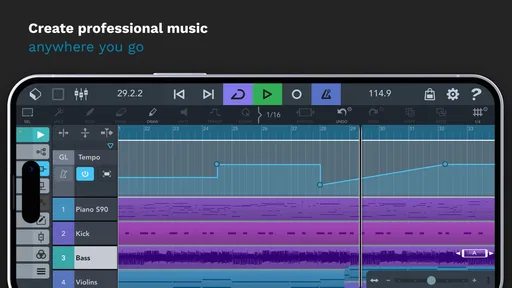
First off, having a fully-fledged digital audio workstation (DAW) on your phone or tablet is kind of a game-changer. Cubasis 3 offers a ton of features that rival desktop DAWs. Imagine having your studio in your pocket, ready to whip out whenever inspiration strikes. From multi-touch to MIDI, this app seems like a producer's dream.
Interface and Usability
Now, let's talk about the interface. It's sleek and intuitive, designed to make navigation a breeze even on smaller screens. The developers have done a stellar job at optimizing it for touch, and I found it fairly easy to get around. You might need a bit of time to get used to all the features if you're new to DAWs, but once you're in the groove, it's a smooth ride.
Turning a quick idea into a workable project
The real value of a mobile DAW shows up when an idea needs more than a voice memo. I might start with a short melody while waiting for a friend, then build a rhythm underneath it and arrange the parts into a rough song without switching to a laptop. A useful habit is to name tracks and sections as soon as a sketch grows beyond a few layers. That small bit of organization makes later edits easier, especially when several MIDI parts and recordings begin to overlap.
I’d also separate “capture” from “finish” in my expectations. A phone is convenient for getting a musical thought down, but a larger tablet gives more room to see the arrangement and work precisely. If I’m recording a vocal idea in a noisy café, I’d expect the environment and microphone to matter more than the DAW. For a quiet room, a basic take can become the starting point for a fuller arrangement; for a polished vocal, I’d plan to listen carefully and possibly record again in a better space.
Worth Reading Before You Choose

Flipboard Shows What News Apps Must Do Beyond the Feed

Switching to Android Auto Means Rethinking Your Driving Routine

Google Calendar Makes a Crowded Week Easier to Manage

Ludo King Makes the Most of the Minutes Between Plans

Baby Panda World Brings Quick Play to Modern Phones, but Its Game Library Feels Busy

ESPN’s Live Game View Makes Following Close Games Easier
Features Galore
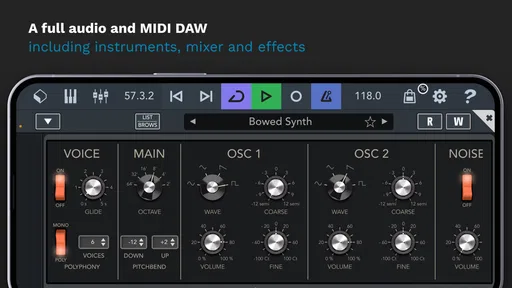
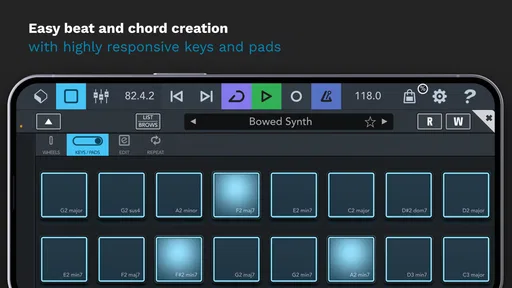
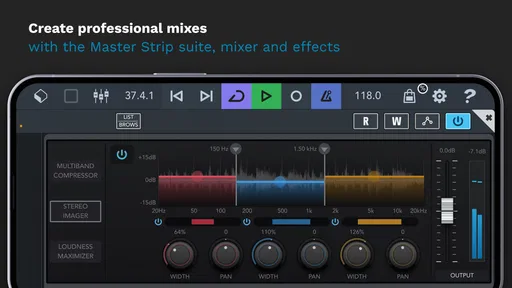
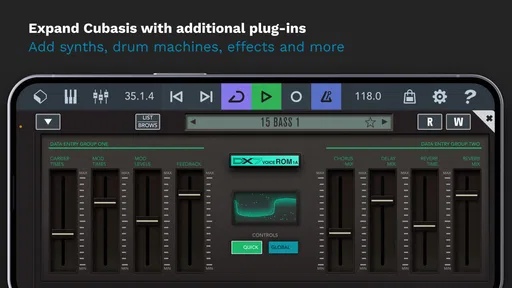
This is where Cubasis 3 truly shines. It packs a punch with features like unlimited audio and MIDI tracks, a powerful mixer with effects, and a wide range of virtual instruments. Plus, the audio quality is top-notch. I was particularly impressed with the Micrologue synthesizer and the wide variety of drum loops. It’s like having a full band at your fingertips!
Making the arrangement easier to manage
One less obvious benefit of having both MIDI and audio in the same project is that I can keep flexible parts flexible. I’d use MIDI for a bass line or chord pattern that may need a different note or sound later, while recording audio when I want to preserve a performance. That choice can prevent a common mobile-workflow headache: committing too early to a part that I’m still changing. It also helps me hear the difference between a performance that feels better played and one that benefits from note-by-note editing.
There is a trade-off, though. A large session can become harder to navigate on a phone even if the app can handle the tracks. I’d keep a working arrangement tidy, mute or remove parts I no longer need, and avoid stacking effects just because they are available. This isn’t only about speed; a clear project makes it easier to judge whether each sound is helping the song. If I’m planning a complex mix, I’d do the detailed balancing on a larger screen whenever possible.
"Cubasis 3 is like carrying a compact studio in your pocket."
Recording and Editing
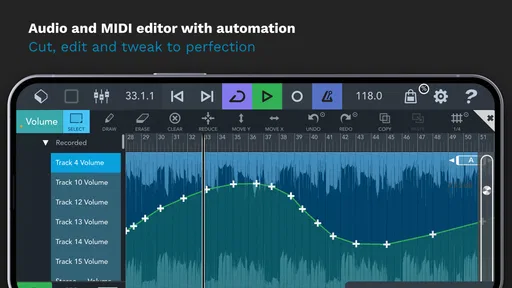
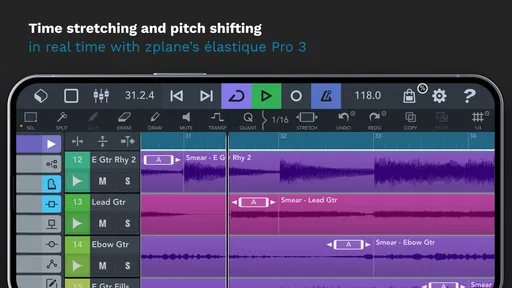
Recording on the go has never been easier. Whether you're capturing vocals or layering complex instrumentals, the app handles it all with ease. The editing tools are robust, allowing you to cut, copy, and paste with precision. And let's not forget the automation features, which are essential for creating dynamic tracks that evolve over time.
Where mobile production fits against other options
Compared with a simple loop-making app, a DAW is better suited to arranging several parts, recording audio and shaping a piece over time. That broader approach is useful when I want an idea to become a song rather than remain a repeating beat. A loop app may still be the better choice if I mainly want instant patterns and minimal setup; it can feel more playful when I don’t want to think about track organization or editing decisions.
Against a desktop DAW, the advantage is immediacy and portability, not a claim that every mobile task is easier. A laptop or desktop gives me more screen space for detailed editing and mixing, and may suit long sessions better. I’d choose Cubasis 3 when touch controls and the ability to work away from a desk matter most, then consider moving a project to another setup if the final stage demands a larger workspace. That hybrid approach is often more realistic than expecting a phone to replace every part of a studio.
Exporting and Sharing
Once you've crafted your masterpiece, exporting it is a breeze. Cubasis 3 supports a variety of formats, ensuring your tracks are ready for sharing or further editing in other software. And if you're into collaboration, the ability to easily share projects is a huge plus. It's all about making music creation as seamless as possible.
A practical routine for finishing a sketch
For a useful everyday workflow, I’d set a small goal for each session: record one phrase, build a drum pattern, or refine a transition. Before stopping, I’d save the project and listen from the beginning rather than judging only the section I just edited. That quick full-playback check can reveal whether a new part actually improves the song or merely sounds exciting in isolation. When I’m ready to share a draft, I’d export a listening copy and keep the project itself available for changes; a rendered track is convenient to send, while the editable session is what I need to keep developing the arrangement.
If I’m handing work to someone using different music software, I’d clarify whether they need a finished audio file or an editable project. Those are not interchangeable forms of collaboration. A stereo export is straightforward for feedback, but another producer may need the separate parts or a compatible session to continue editing. Thinking about that before sharing saves confusion and helps me choose the right handoff for the stage the music is at.
Performance
On the performance front, the app runs smoothly on most devices. I tested it on a mid-range phone and a tablet, and it handled everything I threw at it without breaking a sweat. Just be mindful of your device's capability, especially if you plan on using a lot of tracks and effects simultaneously.
Learning curve and device choice
A new producer may reasonably ask whether the app is approachable without prior DAW experience. I think it can be, but “easy to use” should not be confused with “nothing to learn.” Concepts such as arranging, balancing levels and editing MIDI take practice in any serious production tool. I’d begin with a short project and learn one task at a time instead of trying to understand every control in a single sitting. That makes the learning curve feel manageable and gives each feature a musical purpose.
Device choice changes the experience too. A phone is handy for capturing a melody or adjusting a project during spare moments; a tablet is generally a more comfortable place to inspect a busy timeline. If your device is older or already crowded with demanding apps, keep sessions modest and pay attention to how playback behaves as you add parts. The ability to build a large arrangement does not mean every device will be equally pleasant for every session.
Who is likely to get their money’s worth
I’d recommend considering it if you already make music, want to record and arrange away from a computer, or enjoy learning a more complete production workflow. It may also suit a songwriter who wants one place to develop MIDI ideas and recorded performances into a structured demo. The app’s average rating is 4.6 from around 4.2 thousand ratings, with over 10 thousand installs, which suggests a meaningful audience for a paid mobile studio; I’d still weigh those signals against my own needs rather than treating popularity as a guarantee.
I’d skip it if I only need an occasional metronome, a basic voice recorder, or a quick way to trigger loops. Those simpler jobs don’t call for a full production environment, and paying for capabilities I won’t use is poor value. I’d also pause if I strongly prefer mouse-and-keyboard editing or know I’ll do all serious work on a computer. In those cases, a desktop-first setup—or a lightweight mobile app for sketches—may fit better than adapting to a touch-based DAW.
Final Thoughts
So, is Cubasis 3 - DAW & Music Studio worth it? If you're serious about mobile music production, I'd say absolutely. It combines powerful features with a user-friendly interface, making it perfect for both beginners and pros. Sure, there's a bit of a learning curve, but once you get the hang of it, the possibilities are endless. Whether you're in a café or on a plane, your next hit could be just a tap away.
My buy-or-skip verdict
My recommendation is conditional rather than universal: I’d buy it if I expected to use its recording, MIDI and arrangement workflow regularly, and if I valued making progress when I’m away from a computer. The upfront cost is easier to justify when the app becomes part of a real creative routine, not just something I open once to explore. I’d wait or choose a simpler alternative if I’m still experimenting with music production or mainly want quick loop playback. For the right person, this is a capable pocket studio; for someone who doesn’t need a full DAW, it is more tool than the job requires.
Pros
- Intuitive interface for easy navigation.
- Wide range of instruments and loops.
- Real-time effects with minimal latency.
- Cross-platform compatibility for projects.
- Regular updates with new features.
Cons
- High cost for additional features.
- Limited free version capabilities.
- Occasional crashes on older devices.
- Requires significant storage space.
- No built-in collaboration tools.
FAQs for Cubasis 3 - DAW & Music Studio
What is Cubasis 3 and who is it for?
Cubasis 3 is a mobile digital audio workstation (DAW) designed for musicians and producers who want to create music on the go. It offers a comprehensive suite of tools for recording, editing, and mixing music. Whether you're a professional or a hobbyist, Cubasis 3 provides a portable solution for high-quality music production.
What features does Cubasis 3 offer?
Cubasis 3 includes a wide range of features, such as unlimited audio and MIDI tracks, over 120 virtual instruments, a variety of effects, and advanced editing capabilities. It also supports external interfaces and MIDI controllers, making it a versatile tool for both live performances and studio recordings.
Is Cubasis 3 compatible with all devices?
Cubasis 3 is available for both Android and iOS devices, but compatibility varies depending on your device's specifications. It requires a relatively modern device with sufficient processing power and storage to run smoothly. Always check the app's system requirements on the App Store or Google Play before downloading.
How does Cubasis 3 handle audio export and sharing?
Cubasis 3 offers multiple options for exporting and sharing your projects. You can export your tracks in various formats, including WAV and MIDI, and share them directly to platforms like Dropbox or Google Drive. This flexibility ensures that you can seamlessly integrate your projects with other DAWs or share them with collaborators.
Does Cubasis 3 require an internet connection to function?
Cubasis 3 does not require an internet connection for most of its core functionalities, allowing you to work offline. However, an internet connection is necessary for downloading updates or accessing cloud storage services for project sharing. This ensures that you can continue creating music without interruptions while offline.


